Mall Traffic Pack – Mall Implementation Guide
Mall Traffic Pack – Mall Implementation Guide
Objective
This guide allows the shopping mall to gather all the information the implementation team needs to correctly configure the KSI VISION analytics included in the Mall Traffic pack (perimeter counting and visitor profile).
The information should be completed together with the Operations / Security / IT teams, who have the mall's up-to-date documentation.
Scalability Recommendations
- Use the same names your company already uses in its internal systems and databases to refer to entrances, corridors, stores, etc.
- Centralize all information through a single internal point of contact.
- Save this guide as a base template for future openings or remodels.
General Mall Information
| Field | Description | Example / Note |
|---|---|---|
| Mall name | Name the mall exactly as it should appear on the platform. | Punta Carretas Shopping |
| Time zone | Time zone where the mall operates. | GMT-3 Buenos Aires |
| Opening hours | Days and hours of operation. | Mon–Fri: 10–21 h / Sat: 10–23 h / Sun: 10–22 h |
| Annual holidays | Dates when the mall remains closed. Specify whether they repeat every year or have an end date. | January 1, December 25, July 9 — every year |
| Mall floor plan | PDF file showing the main zones (without cameras). | Attach PDF |
Perimeter Counting
Perimeter counting measures the total visitor traffic entering the mall through all of its accesses.
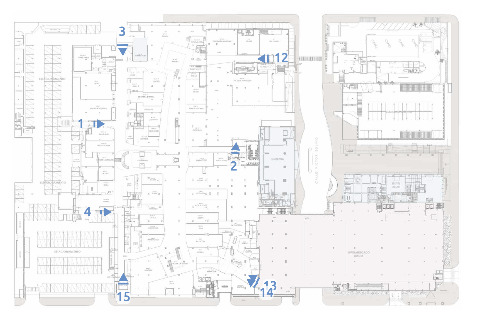
Identifying and Marking Accesses on the Floor Plan
Identify on the floor plan every access that requires measurement. Accesses may include:
- Pedestrian accesses from the public street
- Pedestrian accesses from the parking
- Accesses from connected office towers
- Accesses from hotels or other integrated buildings
- Internal accesses to closed sectors (e.g., a hypermarket inside the mall)
Deliverable: the floor plan with every access marked and an ID identifying each one.
Special Criteria for Parking Accesses
For accesses from the parking, apply the following criteria:
- Case A – Elevators connect the parking with a single mall floor. Cover only the elevator exits into the mall, not the parking side.
- Case B – Elevators connect the parking with several mall floors. Cover the elevator entrances on each parking floor, since visitors may use the elevator simply to move between floors from inside the mall and must not be counted as perimeter traffic.
- Case C – Elevators connect parking floors only with each other. Do not cover them, as they are not mall accesses.
Naming Accesses
Accesses must be named exactly as they will appear on the platform.
Recommendation: keep a fixed naming pattern, such as [Access type] + [Level or street] + [Reference point]:
- Entrada Av. Santa Fe
- Entrada Torre de Oficinas Norte
- Entrada Parking P1 Sur
- Entrada Peatonal Calle Sucre
- Entrada Hotel Interconexión

Deliverable – Access Table
Complete an Excel sheet with the following columns for each access:
| Column | Description |
|---|---|
| Access ID on the floor plan | The same ID marked on the plan |
| Access name | As it will appear on the platform |
| Camera code on the plan | Camera with a view of the access |
| Camera IP | IP address of the camera |
| Camera user / password | Credentials to access the camera |
Users and Access
Available roles:
| Role | Description |
|---|---|
| Viewer | View dashboards and download information |
| Tenant | View analytics only for their own store(s) |
| Admin | Viewer + configuration + user creation |
Provide the email address and role for each person who needs a user account:
| Name | Role | |
|---|---|---|
Sending the Information
Once you complete the tables and prepare the required files (floor plans, access lists, camera credentials), send everything to the setup team:
Make sure to include:
- The mall floor plan with access identification.
- The completed access table (Excel).
- The user list with roles.
- A contact person in case the team needs further validation.
Once received, the team will review the information and contact you if any adjustments or confirmations are needed.